Inventrack 6.0
Precision in every asset.
Centralised IoT and robotic command and control: one system of record for every asset, person, sensor and machine on your site — from procurement to disposal, from a gate read to a robot mission.
- 5
- layers on one live map
- 9
- sensor types in Sensor Tracking Mode
- 3
- ways to see: RFID, IoT sensors, cameras
- SaaS
- by subscription, hosted for you in the cloud
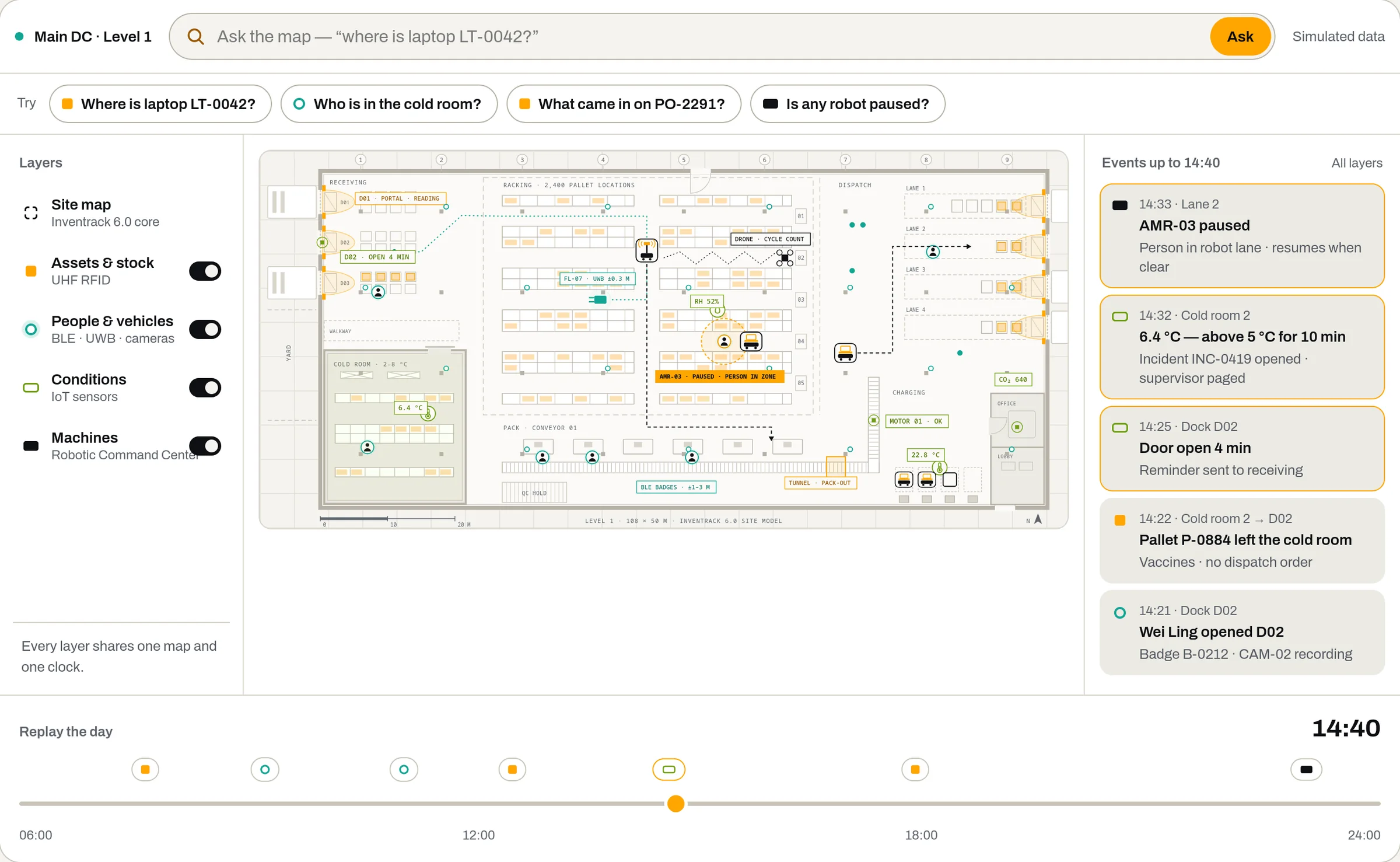
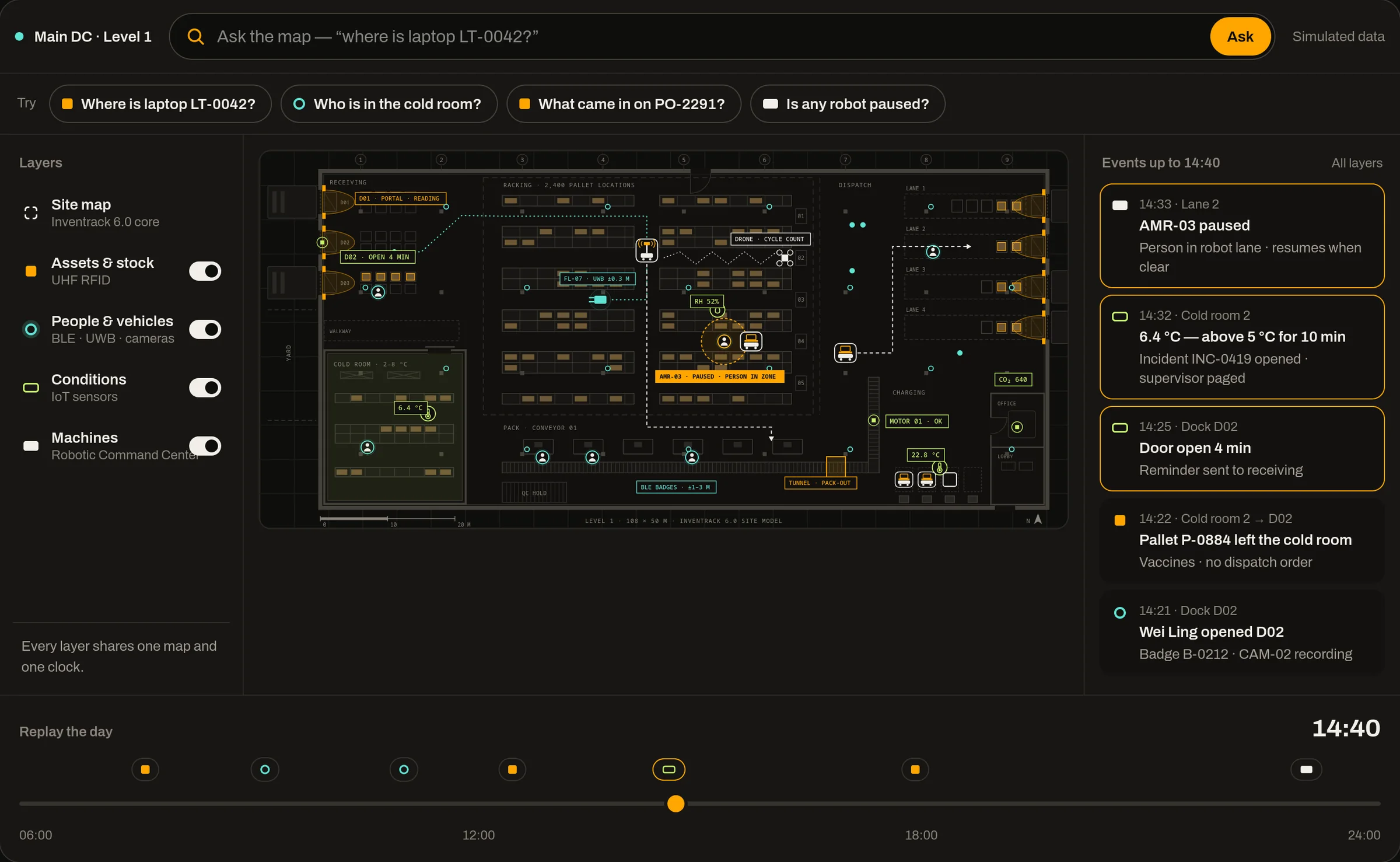
RFID, IoT sensors and cameras — together.
Inventrack brings what your readers, sensors and cameras see into one record, so every alert already knows where, what and who.
RFID tracking
Zone monitoring, instant alerts and live inventory updates across locations — gates, portals, shelves and handhelds read many tags at once.
Sensor Tracking Mode
Temperature, humidity, pressure, weight, vibration, light, motion, CO₂ and air quality, each with its own thresholds, alerts, live dashboards and history.
Camera integration
Video analytics with motion detection and visual inventory checks, timestamped captures at the dock, and face matching for secure-area access.
Indoor positioning
Room-level BLE beacons and centimetre-level UWB for people, vehicles and critical assets, with geofences and 3D, multi-floor maps.
Nine engines, one record.
Asset lifecycle
Procurement to disposal: check-in and check-out, loans, audits and transfers in one history.Real-time tracking
Geofencing, 3D mapping and multi-floor plans across RFID, BLE 5.0, UWB, LoRaWAN and sensor networks.Workflow automation
Workflows triggered by RFID events, schedules or manual actions, with automated alerts and escalations.Analytics
Utilisation, movement patterns, loss prevention and workflow efficiency, on dashboards you can shape.Predictive maintenance
Machine-learning analytics flag maintenance needs, replacement cycles and cost-saving opportunities.Depreciation
Straight-line, declining-balance and units-of-production methods, with audit trails for finance.Checklists & compliance
Custom inspection forms with photo capture, digital signatures and scheduled tasks.Multi-site
Multi-tenant, hierarchical zones, transfers between locations and central reporting.Enterprise integration
Two-way sync with SAP S/4HANA, IBM Maximo, ServiceNow, Oracle EAM and Microsoft Dynamics; REST API and webhooks.Tracking BLE tags? Inventrack also powers the BLE Tracking SaaS Singapore plan — per-tag monthly pricing in SGD, hardware included or leased, Singapore-based support.
Ask in plain words. Aivy finds it, explains it or does it.
Aivy is the AI agent behind the “Ask the map” box in Inventrack. It answers from your own records and Inventrack’s help guides, takes you to the right screen, and does the task for you, after showing you exactly what will change.
- Status: available
- Put away at 09:30 today
- Transfer PL-24017 · Racking row 03 → QC Hold
- Notify QC team · “PL-24017 is in QC Hold: damaged carton”
- 1AskType a question or a request in the “Ask the map” box above the map, or in Mobile View, and press Ask.
- 2Aivy answersAivy answers on the map, from your own records and Inventrack’s help guides, with links to the screens.
- 3Aivy lists the changesAsked to do something, Aivy shows each change it will make first: one, or several at once.
- 4You confirmNothing changes until you confirm. The change is made as you, within your role, and logged under your account. Cancel, and nothing changes.
What you can ask Aivy
- Find anythingItems, units, locations, documents, audits, bookings and contacts: “where is laptop LT-042?”, “what is in Store Room 2?”
- See what needs youApprovals waiting for you, audits waiting for review, and recent activity.
- Do the taskCreate documents, items, locations, contacts, audits and bookings; transfer, consume or dispose items; adjust quantities; change document, audit and booking status.
- Reminders and notificationsSet reminders, notify a group, and create reminder and notification rules.
- Show you howAsk “how do I receive a purchase order?” and Aivy answers step by step from Inventrack’s help guides.
- Take you thereSay “take me to units of measure” and Aivy opens the screen.
- Build a reportOn Custom Reports, describe what you want to see. Aivy picks the data and fields, asks up to four questions, and you check the preview before you save.
- Export to ExcelAsk for a list “in Excel” and Aivy gives you a download link. The link expires after 10 minutes.
Where to find Aivy
- Ask the map
- The box above the map: type a question or a request and press Ask.
- Chat button
- The round button, bottom right, opens the chat window, where you can also attach up to three images.
- Its own tab
- Open the chat full screen on a tablet or a second monitor; the same conversation carries on.
- Mobile View
- Chat with Aivy from your phone.
- History
- Earlier chats are kept, to pick up again or delete.
Safeguards
- Your role, your limitsAivy can only see and do what your role allows.
- Nothing changes without youEvery change waits for your confirmation.
- On the recordChanges are made as you and logged in the activity log under your account.
- Switched on per organisationAivy is enabled organisation by organisation; your Organization page shows whether it’s on.
What teams use it for.
-
Warehouse loading documentation
RFID scans at the dock trigger a camera capture, so every shipment has timestamped visual proof.
-
Cold storage monitoring
Round-the-clock temperature and humidity checks, tiered escalation and history for compliance reports.
-
Multi-factor security
RFID badges, vision-based person detection and motion sensors control and log restricted areas.
-
Emergency response
RFID mustering shows who is where, flags anyone unaccounted for and supports evacuation.
-
Vehicle access
Gates open for authorised vehicles by licence-plate recognition or RFID tag, with every movement logged.
-
Occupancy & capacity
Live headcount per area, with alerts or access limits as a space nears capacity.
-
Pick by light (e-paper)
Battery-free e-paper labels show pick quantities at each location, synced with your WMS.
-
Datacenter assets
Equipment lifecycle by RFID, nightly scans for moved or missing kit, and rack, power and cooling in view.
-
Environmental monitoring
Temperature, humidity, air quality and CO₂ across the facility, with predictive alerts.
-
Route compliance
RFID checkpoints confirm items follow their route and flag missed or out-of-sequence steps.
Tell the machines what to do.
Because Inventrack already knows where your stock, people and sensors are, it can dispatch AMRs, AGVs, drones and cobots — and keep them clear of people.
- Mixed-fleet viewRobots from different vendors on one map.
- Event-driven missionsA gate read or sensor alert can dispatch a robot.
- Safety zonesRobots slow or pause near UWB-tagged staff.
- Robots as assetsBattery, faults and maintenance in one lifecycle.
- Full audit trailEvery mission, stop and override logged.
- Open interfacesREST, MQTT, OPC UA · fleet adapters.
Built for audited sites.
- Role-based accessPermissions by role, with Microsoft Entra ID single sign-on.
- Audit trailsEvery change and movement recorded with who and when.
- Two-factor sign-in2FA, plus IP blocking for sign-in.
- Encrypted storageData encrypted at rest.
Intensecomp ISMS certified to ISO/IEC 27001:2022 by TÜV SÜD (IS27-2026-0369) · SOC 2 Type II examination in progress.
Audit trails and reports support regimes our customers work under, such as FDA 21 CFR Part 11, HACCP and GDP for cold chain.
System requirements.
- Delivery
- Cloud-native SaaS, by subscription only
- Connectors
- MQTT, HTTP, REST API and webhooks, GraphQL, OPC UA
- Identification
- RFID, QR codes, AI image recognition
- Location & IoT
- BLE 5.0, UWB, LoRaWAN, GPS, industrial protocols
- Enterprise systems
- SAP S/4HANA, IBM Maximo, ServiceNow, Oracle EAM, Microsoft Dynamics; PMS, ERP and inventory systems
- Sign-in
- Microsoft Entra ID single sign-on, role-based access, 2FA
- Interface
- Web, mobile-first; English and Chinese
- AI agent
- Aivy: the “Ask the map” box, the chat window and Mobile View
Questions, answered.
Can Inventrack 6.0 run on our own servers?
No. Inventrack 6.0 is offered only as a cloud SaaS subscription, hosted and run for you.
Does it integrate with SAP, IBM Maximo or our ERP?
Yes. It syncs both ways with SAP S/4HANA, IBM Maximo, ServiceNow, Oracle EAM and Microsoft Dynamics, connects to PMS, ERP and inventory systems, and offers a REST API with webhooks for real-time events, plus GraphQL, MQTT and OPC UA.
Does it support multiple sites?
Yes — multi-tenant and multi-site, with hierarchical zones, transfers between locations and central reporting.
Which tracking technologies does it support?
UHF RFID, BLE 5.0, UWB, LoRaWAN, GPS, QR codes and barcodes, environmental sensors through Sensor Tracking Mode and Inventrack Sense, and camera feeds.
How does workflow automation work?
Workflows start from RFID events, time schedules or manual actions; alerts and escalations make sure someone responds in time.
What is Aivy?
Aivy is the AI agent built into Inventrack 6.0. From the “Ask the map” box, it finds your records, answers how-to questions from Inventrack’s help guides, opens the right screen, builds custom reports and Excel exports, and does tasks such as creating documents or transferring items.
Can Aivy change our data without asking?
No. Before any change, Aivy shows what it will do, and nothing changes until you confirm. It can only see and do what your role allows, and changes are logged under your account.
Can it command robots from different vendors?
The Robotic Command Center shows mixed fleets on one map and dispatches missions through fleet adapters.
How is our data secured?
Role-based access, audit trails, two-factor sign-in, IP blocking and encrypted storage. Intensecomp's ISMS is certified to ISO/IEC 27001:2022 by TÜV SÜD (IS27-2026-0369), and our SOC 2 Type II examination is in progress.
Is it suitable for small businesses?
Yes. As a cloud SaaS subscription, it suits businesses of all sizes in Singapore and globally.
How long does implementation take?
Typical implementation takes 4–12 weeks depending on scope and complexity. We provide full training and ongoing support.